Features
Every feature below is a working miniature of the real thing. Try each one right here, without an account.
01Collaboration
Write together, live
Everyone edits the same document at the same time, with their name on their cursor. Collaborators are unlimited on every plan, including Free.
Try it: Type on line 3 while Euler and Gauss write around you.
Collaboration guide02Review
Track changes and comments
Select a passage and suggest a rewrite instead of making it; the others accept or reject each one. Comments stay attached to their text, and viewers can comment too.
Try it: Accept one suggestion, reject the other, and reply to Plato.
Review guideSuggested changes 2
EEuclid replaced
− loose
+ tight up to a constant
EEuclid replaced
− large $n$
+ all $n \ge 2$
Comments 1
The bound
PPlatoCite the lemma here?
03Convert
Handwriting, screenshots, and PDFs to LaTeX
Photograph your notes, snip an equation from a screenshot, or upload a PDF, and get source you can edit. Free includes 20 images and 40 PDF pages a month.
Try it: Pick another sample and watch it convert.
Image to LaTeX guideLaTeX
\[ Compiles to
04TikZ
A TikZ library that compiles
Rendered, copyable figures for packages such as tikz-cd, quantikz, pgfplots, and circuitikz. Insert one from the editor and adapt it.
Try it: These are the library's real renders. Switch figures and copy the source.
Browse the library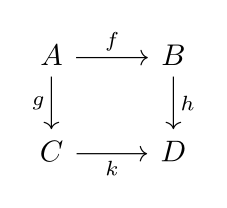
Source
\usepackage{tikz-cd}

\begin{tikzcd}
  A \arrow[r, "f"] \arrow[d, "g"'] & B \arrow[d, "h"] \\
  C \arrow[r, "k"'] & D
\end{tikzcd}
05AssistantOn Pro and Team
An AI assistant, and dictation
Ask for a change in plain words, typed or spoken. The assistant reads your project and any reference papers you attached, and every edit arrives as a diff you accept or reject.
Try it: Ask for a change, or press Dictate, then accept the diff.
See the plansAsk for a change in plain words. It arrives as a diff, and nothing changes until you accept it.
06Editing
Code or visual
Write LaTeX with autocomplete for commands, citations, and labels, or switch to a view that shows headings, lists, and equations as they will look.
Try it: Switch between Code and Visual.
Visual mode guide1Results
The energy of a particle at rest is given by [einstein1905]:
- is the rest mass
- is the speed of light
07Builds
Builds that finish
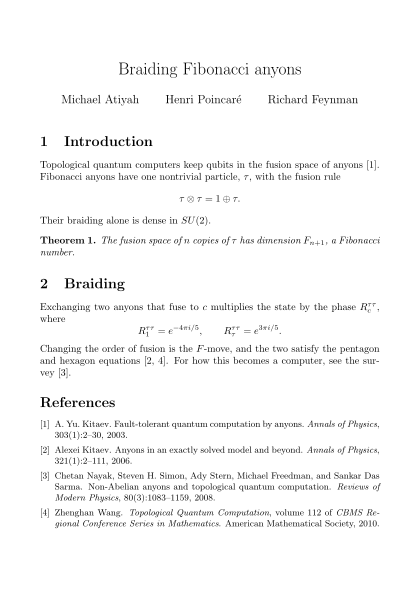
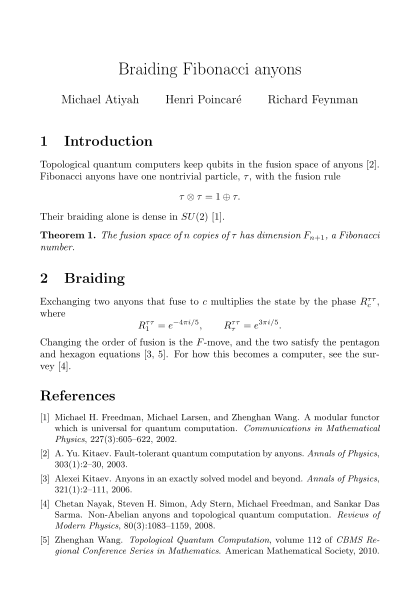
Full TeX Live with pdfLaTeX, XeLaTeX, and LuaLaTeX. BibTeX or Biber, indexes, and glossaries run on their own, and errors point at the line that caused them.
Try it: Recompile, then break line 19 and recompile again.
Compiling guide- Press Recompile to build the PDF.
08References
Cite from a DOI or an arXiv ID
Paste an identifier to add the BibTeX entry to your .bib file and cite it at the cursor. \cite{ and \ref{ then complete from your own keys and labels.
Try it: Add both sample papers.
References guidemain.tex
Transformers changed how sequences are modeled.
references.bib
Empty. Add a reference above.
09GitHub
GitHub sync, both ways
Link a repository, then push and pull. A push is refused while GitHub has commits you have not pulled, so nobody's work is overwritten.
Try it: Push first, then Pull, then Push again.
GitHub sync guideTeXeR main
- Revise introductionb27e9d1Youonly here
- Add results sectiona1f04c2You
GitHub main
- Fix typo in appendixc3a6b88Newtononly here
- Add results sectiona1f04c2You
10Palette
Everything from the keyboard
Press Shift and Space for the insert palette: snippets for tables, figures, matrices, and theorems, plus the whole TikZ library with previews.
Try it: Search for “table” or “matrix”, then press Enter, or press a number.
Keyboard shortcutsWhat it inserts
\documentclass{article}
\usepackage[utf8]{inputenc}
\usepackage{amsmath, amssymb, amsthm}
\usepackage{geometry}
\geometry{margin=1in}

\title{Untitled Document}
\author{Author Name}
\date{\today}

\begin{document}
\maketitle

\section{Introduction}


\end{document}
11Also
And the rest
- Reference papers
- Attach arXiv papers to a project with their full LaTeX source. Read them, compile them, and let the assistant use them as context.
- Templates
- Start from a built-in template or one someone shared, and save any project as your own.
- ZIP and arXiv import
- Bring a whole project in, folders and figures included, and download it as a ZIP at any time.
- File history
- Thirty days of versions for every file, with labels and one-click restore.
- Spell check
- Seven languages, with commands, math, and citations skipped.
- Word count
- Follows \input and \include, and counts headings, captions, and footnotes separately.
- Project chat
- A chat for everyone on the project, next to the document.
- REST API
- Projects, compiling, and conversion from your own tools, with API keys.
- Self-hosting
- Run the whole platform on your own servers when your data has to stay there.
Now try the real thing.
Free for unlimited projects and collaborators. No card, and your work stays plain LaTeX you can take anywhere.